Design

Andes Path Expertise | UI/UX Design for Physical AI Systems
At Andes Path, we build a lot of the software used around autonomous machines in complex physical environments, like manufacturing. That software often includes UX work, because it's only useful software if people can use it. This post has several actionable tips about how we do it well, in the context of a confidential client project where people, hardware, networks, and real operations all intersect.
Let’s imagine that this client makes finished construction materials, like premium windows for homes and offices. If you walk onto the floor of their factory, running with lots of autonomy, you’ll see the impacts of their software design long before you see a screen. It’s in how an operator in work gloves interacts with both a tablet device and an actual pane of glass, or a receiving coordinator holding two radios and a phone, or a delivery driver who left cell coverage 40 minutes ago and still has to confirm that their delivery of 32 double pane windows actually happened.
That floor is where this project started. The client ran factory operations and delivery dispatch across three countries with ten different software tools and systems, some custom and some 3rd party, none of them connected. Each tool made sense to the team that originally shipped it, but as a collection it didn’t make sense. None of them had been designed around the people standing there in gloves, and the seams between the tools had become friction, requiring a lot of manual record keeping and coordination.
Every Physical AI system runs on a chain of handoffs. The environment hands the machine a reading, the machine hands the operator a state, and from there a second chain runs between the people who keep the operation moving: operator to coordinator, coordinator to driver, driver to customer. Most of the off-robot software we build at Andes Path sits at one of those seams, between a physical environment with a new technology, and the people who use it. This project sat on nearly all of those seams, all at once. Ten tools meant different answers to who hands what to whom, from glass technicians to order takers.
In the video here, Berni, our lead designer, talks it all through, along with one one of our engineers, and one of our co-founders.
The first weeks of a project are spent understanding how the work actually happens. Who does it? Where do they stand while they do it? What’s on their hands, what is in their ears, what the light is like, what the network is like... We map the whole ecosystem of people and machines before anyone opens a design tool.
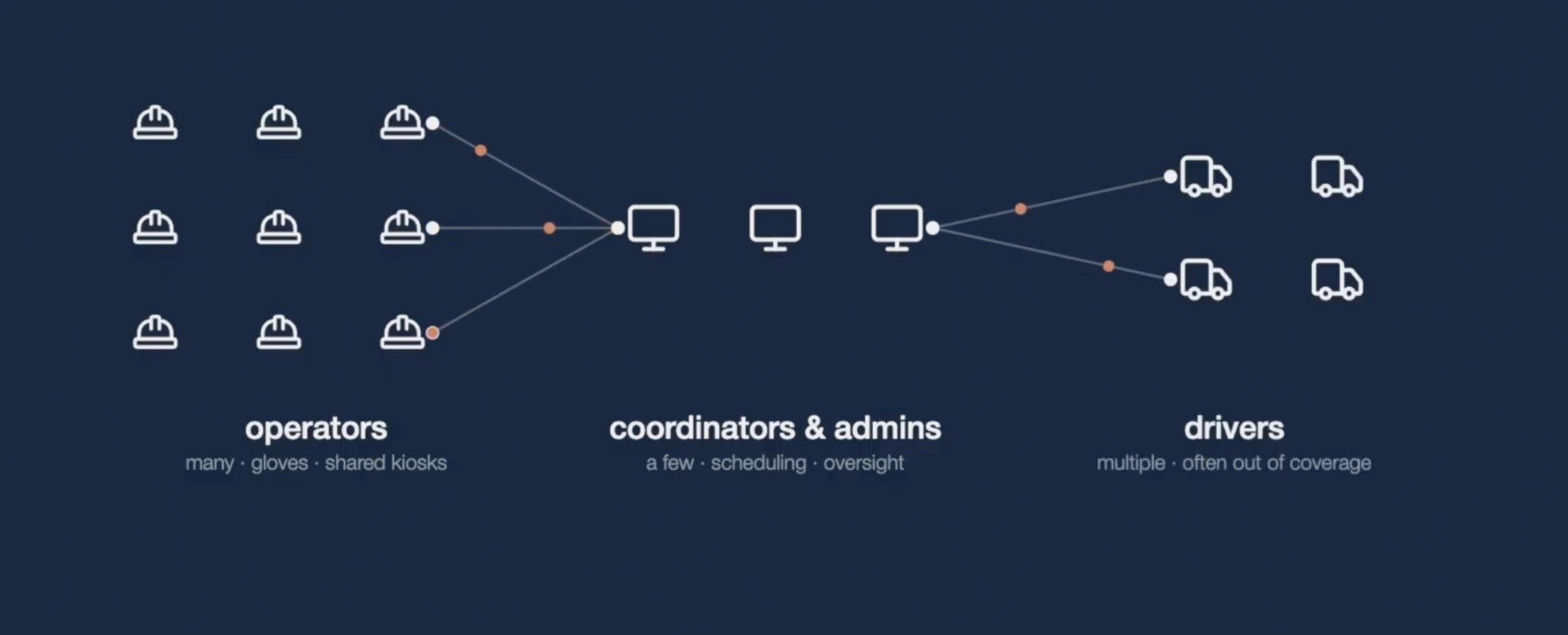
This sounds obvious and it is routinely skipped, usually because the software was scoped from a feature list rather than from the floor. A feature list will tell you that dispatch needs a proof-of-delivery step. It will not tell you that the truck has no signal when the step happens, or that the person completing it is wearing gloves, or that one region has harsh winters, or that the kiosk they will return to is shared by three shifts on the glass cutting line.
From inside the operation this rarely presents as a design problem. It looks like new hires taking weeks to become useful, a status retyped from one screen into another, and errors that cluster at shift change. That shape is not specific to factories. Any operation that has grown its software one tool at a time, a warehouse, a port, a mine, a farm, a hospital's logistics floor, ends up here. The vocabulary changes and the gloves change. The handoffs do not.
With the physical process understood, design and systems engineering work together on a single service blueprint. For this client that meant dispatch, end to end: five phases, from a contractor ordering custom windows for a new office building down through the cutting machines and the APIs underneath them. Every role, every handoff, every point where a human decision meets an automated one, on one document that both disciplines own.
A service blueprint is, at bottom, a map of handoffs. Every arrow on it is a moment where one person or system passes something to another, and every one of those moments is a design decision and an engineering decision at the same time: what gets passed, in what form, and what happens when it fails. That is why both disciplines have to own the document. Neither can answer those questions alone.
The blueprint does the job that ten separate specs never could. It exposes where the same task was being represented three different ways, where a status lived in one system and was retyped into another, and where the physical constraint of the site was going to shape the architecture. Only after the blueprint is agreed do we start drawing screens, and by then most of the hard decisions have already been made.
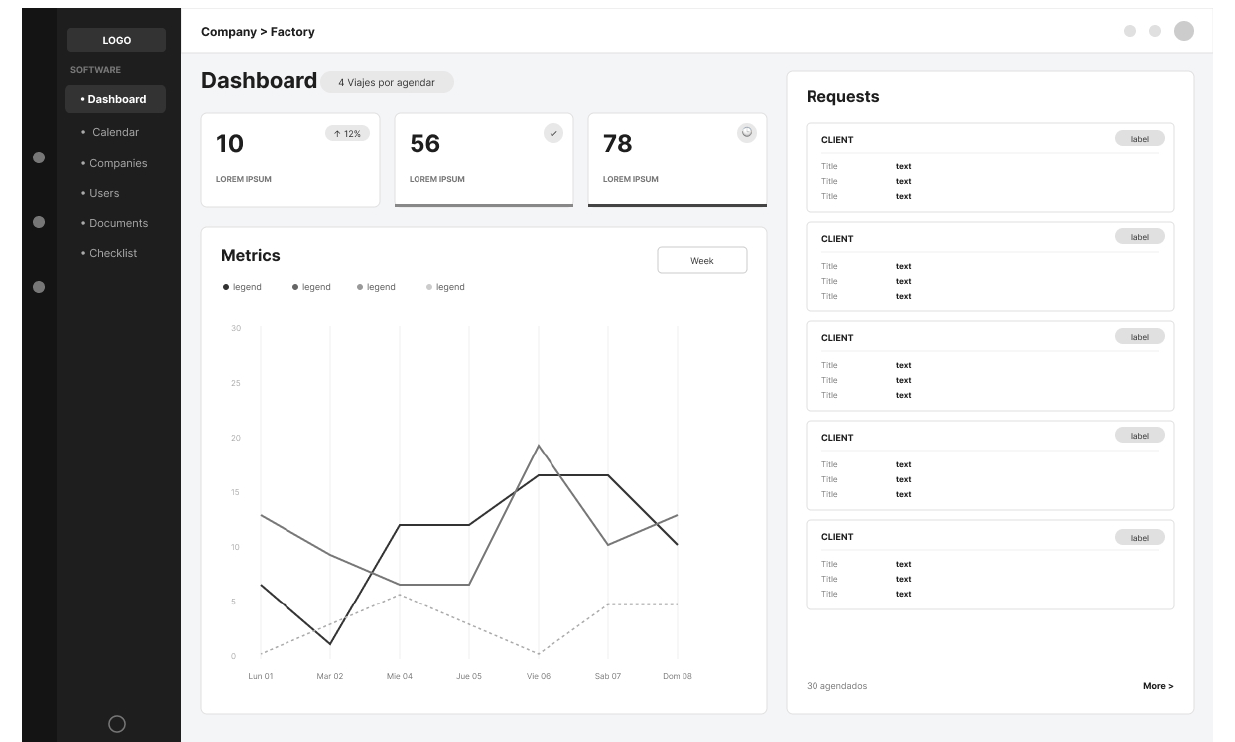
Ten applications became one platform. One shell, one design language, one set of components, with role-based views on top. An administrator sees everything. A coordinator sees the day's work. A driver sees a phone app with exactly what the route requires.
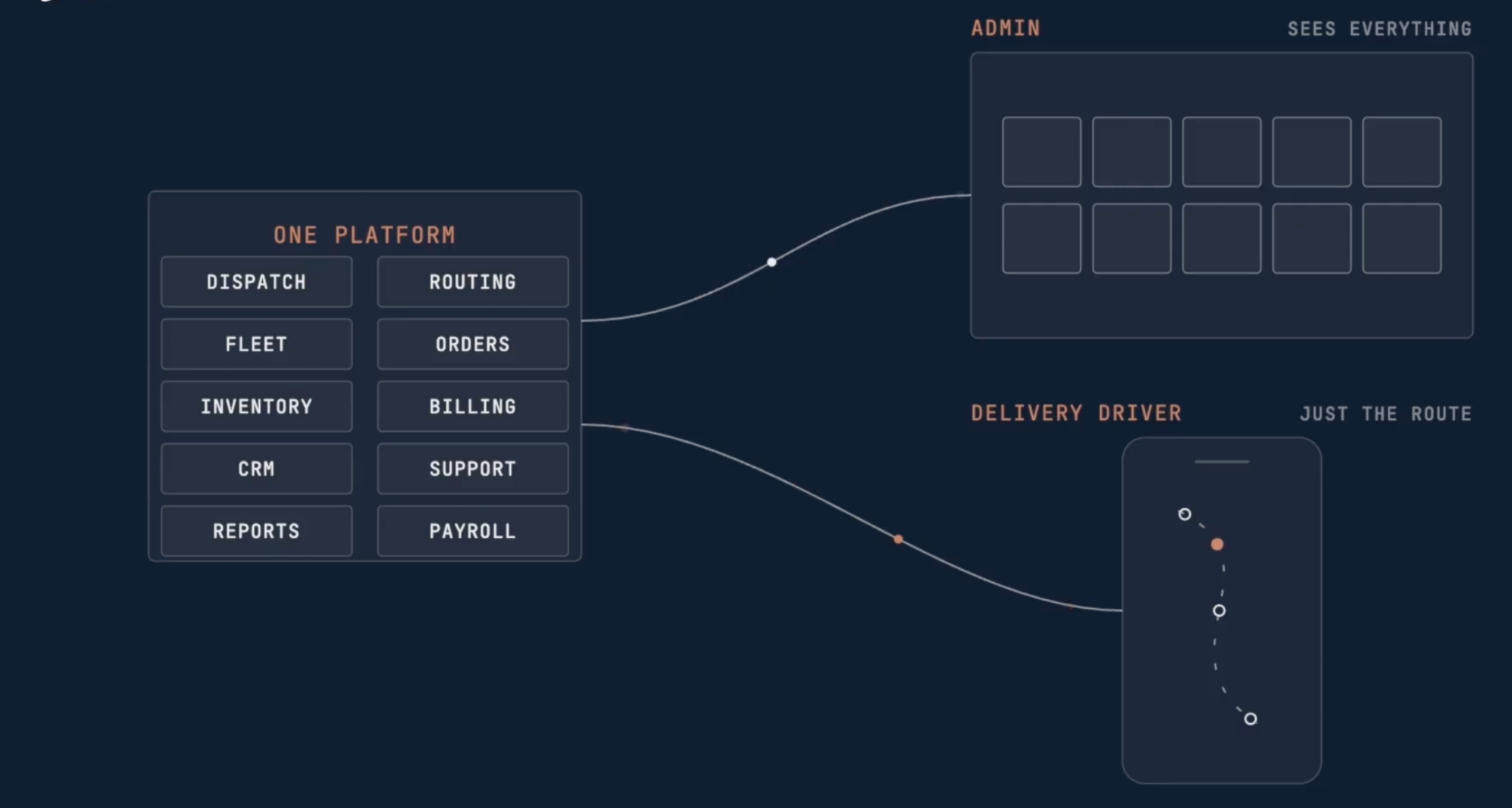
For an engineering leader, the consequence is what happens next. A new module inherits the platform instead of negotiating with it. Authentication, permissions, navigation, data conventions, and visual language are already settled, so the team building the next capability spends its time on the capability. The design system stops being a document and becomes the thing everyone builds inside.
Some delivery locations for this client have no coverage at all, sometimes because new housing developments and commercial builds often go up ahead of the cell towers. That fact came out of the network map we built during the first phase, and it decided the architecture of the driver app before a single screen existed. The app is offline first. Proof of delivery, photos of every pane arriving intact, the site foreman's signature, all of it is captured locally on the phone and synced when the truck finds a signal again.
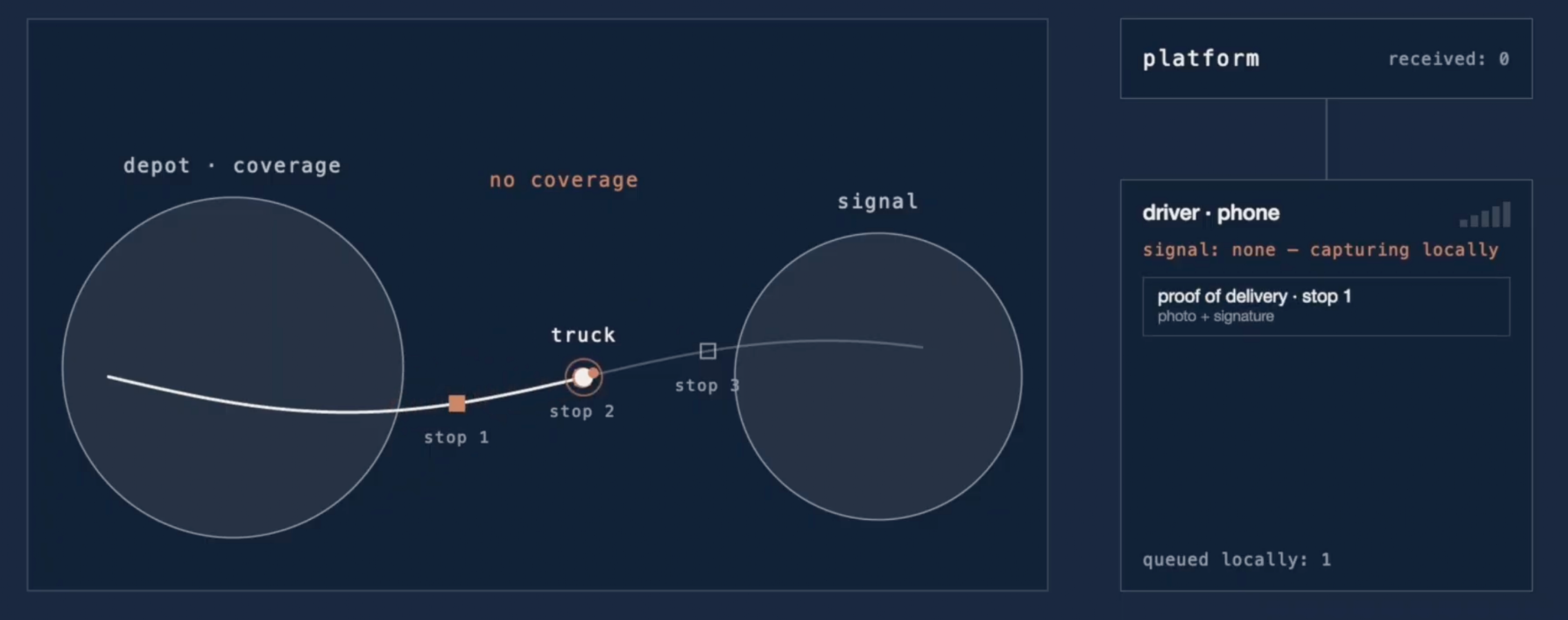
Offline first is a commitment, not a setting. It means the phone holds the source of truth for a period of time, the sync has to be idempotent and tolerant of partial uploads, and the interface has to make it obvious to the driver what has been captured and what is still waiting. Those are engineering problems and design problems at the same time, which is why we run them as one team.
Our clients build the autonomy core. Our work is everything around it: the operations layer that runs the fleet in production, the data and simulation tooling that validates it, the operator tooling that puts it in people's hands. That off-robot software has one job, which is to run a physical process reliably with real people in the loop. And the last handoff in any Physical AI system is to a person. If that one fails, nothing upstream of it matters.
You cannot design that from a screen inward. The machine, the site, the network, and the person holding the device are the inputs, and the interface is the output. Learn the physical process first, build the foundation once, and everything added afterwards inherits it.
The window factory is incidental to all of this. Swap it for ground crews at an airport, a hospital's supply chain, an open-pit mine or a greenhouse and the inputs are the same. Some details change, like types of glove, noise, light, or networks. What doesn’t change is that someone standing in the physical world has to receive what the machine produced and act on it, and that the tools in their hand often decide whether the whole system works or not.
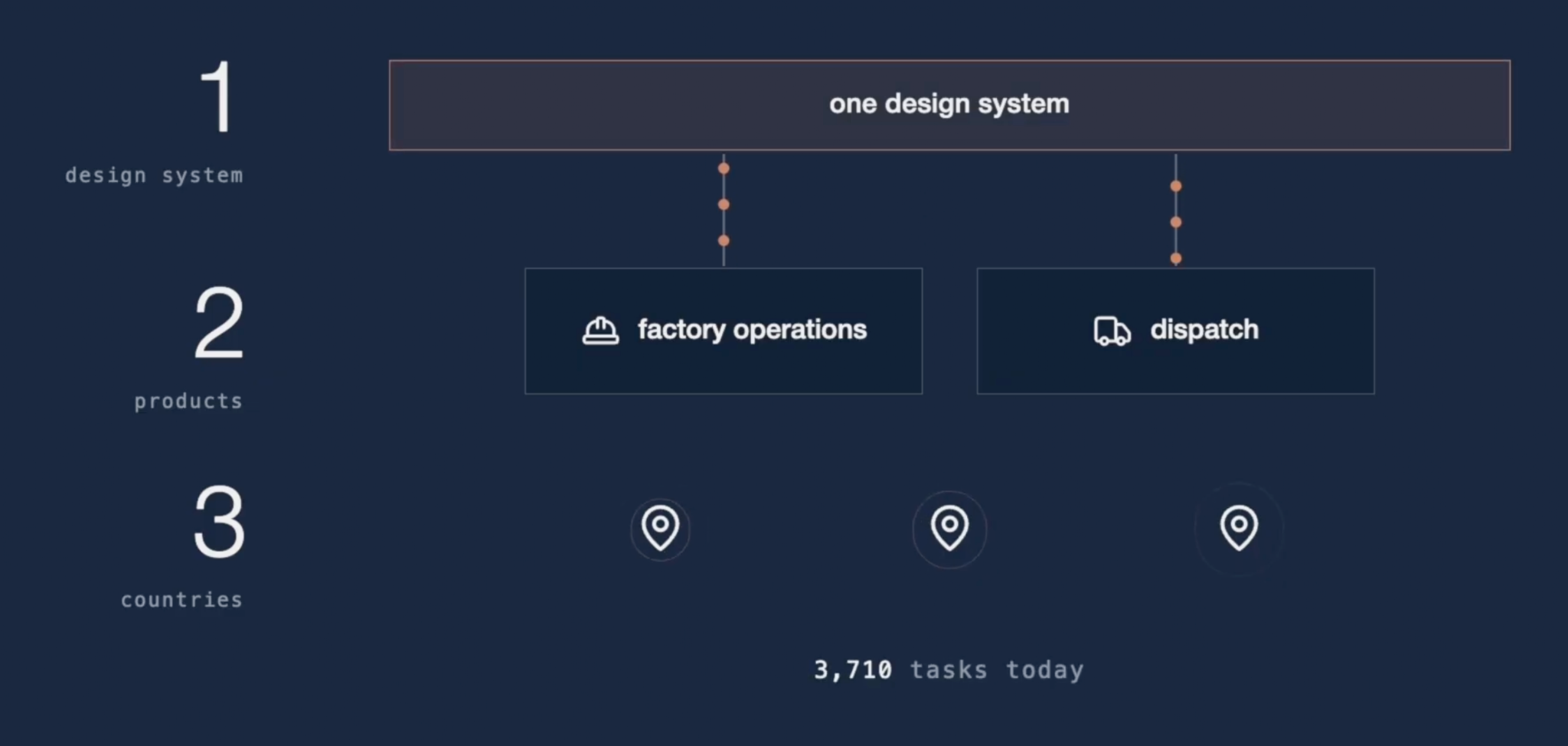
Today that platform runs the work in three countries, across two products, covering factory operations and dispatch, under one design system, managing thousands of tasks a day. The people on the floor use one tool. The teams building on it start from the platform instead of from scratch.
Watch the video to hear the team walk through it in their own words. And if your autonomy is working and the software around it is where the friction lives, in a factory or anywhere else that people and machines share a floor, that floor walk is usually where the conversation with us begins.
Insights