Design

We work with startups and corporate innovation labs to build the data infrastructure behind physical AI, including complex data recording and replay pipelines. Our pipelines take what a robot's sensors produce and store it. Those pipelines then hand it back to engineers, test rigs, and training jobs in usable forms. We have built replay systems of this kind many times. The one in this post had some of the hardest requirements so far.
The client needed one system that could record every sensor stream, keep them aligned, and replay any instant on demand.
The robot carried multiple cameras capturing at different frame rates and an IMU and a pressure sensor at 400 Hz. Live and recorded data had to come from one system. Several engineers needed to scrub different runs at the same time. CI had to replay runs with no browser. A QA tool had to promote good runs into training datasets. And these tools changed several times during the project. All of it had to agree on what happened at any given instant.
Every previous version we built put the replay engine inside the client, so each tool carried its own copy, and every one was rebuilt when the client changed. This time we put it on the server, as a session that owns a clock. Replay is a session moving its clock through a recording. Live is the same session with its clock pinned to now.
Most of what follows comes from that one decision:
In the video, Clark Jeria, our co-founder, walks through the main decisions we made in making that decision.
The client already had the live half. A custom pipeline, written in C#, fed their legacy data system with live data and nothing else. What they needed next was to record everything and replay it later, for three consumers with different needs:
The data types are similar for most robots. Multiple cameras capturing at different frame rates. An IMU and a pressure sensor at 400 Hz. A few lower-rate state streams. Every stream arrives on its own schedule, stamped by the robot's clock, and none of them means much alone. A pressure spike only tells you something when you can see the IMU sample and the camera frame from the same instant.
The network was typical and messy: robots on Wi-Fi, engineers on VPN, different subnets, dropped connections, and some large messages. The client was still deciding on their front end, and they changed it several times during the project. Anything tied to one client or UI would have been rebuilt each time.
This is a well-worn problem. ROS teams record a bag and replay it with ros2 bag play. Foxglove and Rerun both do the viewing side well, and both have moved time alignment out of the UI. We used Foxglove as one of the front ends. None of them could be the backbone here, for three reasons specific to this client: live and replay had to be one path, since their legacy live C# pipeline was being retired; several engineers and CI jobs needed independent sessions on shared servers; and the engine could not belong to any one viewer, because the viewer was going to change.
The approach we had used before, more than once, puts the engine in the client. The first version is simple. The browser subscribes to every stream, keeps a window of each in memory, lines them up on a shared clock, and moves a playhead through the result. It works for a laptop and a short log. Then the data grows, and the replay code grows with it. Buffering gets smarter, then gets a worker thread, then gets a cache. Every scrub re-buffers every stream. Engineers start asking for bigger laptops. Then someone needs the same replay in CI, with no browser, and the engine gets written a second time in a second language. Eventually the front end changes, and all of it gets written again.
Streaming video is a solved problem because it is a bounded one: two streams, audio and video, decoded by hardware the browser already knows how to drive. Robot telemetry is the same problem with more tracks, higher rates, and clocks that do not agree, handled by a browser tab with one busy main thread and a limited memory budget. By the time this project started we had seen the cycle enough times to know how it would end with two cameras and 400 Hz streams. The engine had to live somewhere every client could share, so it would be written once.
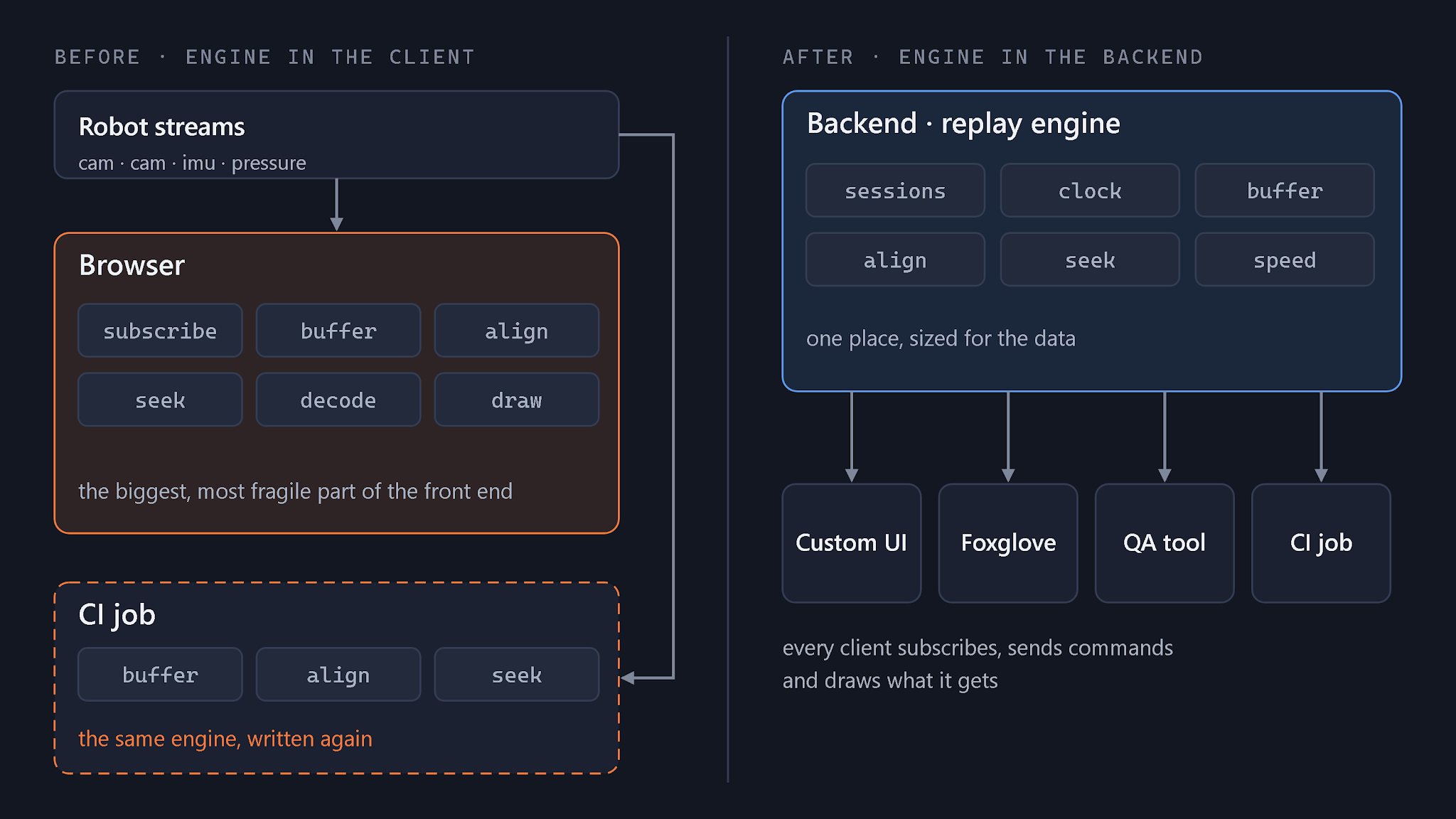
For this project, all of the replay logic went to the backend, and the client only asks for data. We gave the backend's unit of work a name: a session.
A session is opened against one recording, or against the live feed. A client subscribes to it and sends four commands: play, pause, seek, and set speed. The session does everything else. It owns the clock, keeps every stream aligned to that clock, buffers data around the current position, and pushes the newest frame of each stream to the client as the clock advances. The client does no synchronization and holds no history; it draws only what it receives.
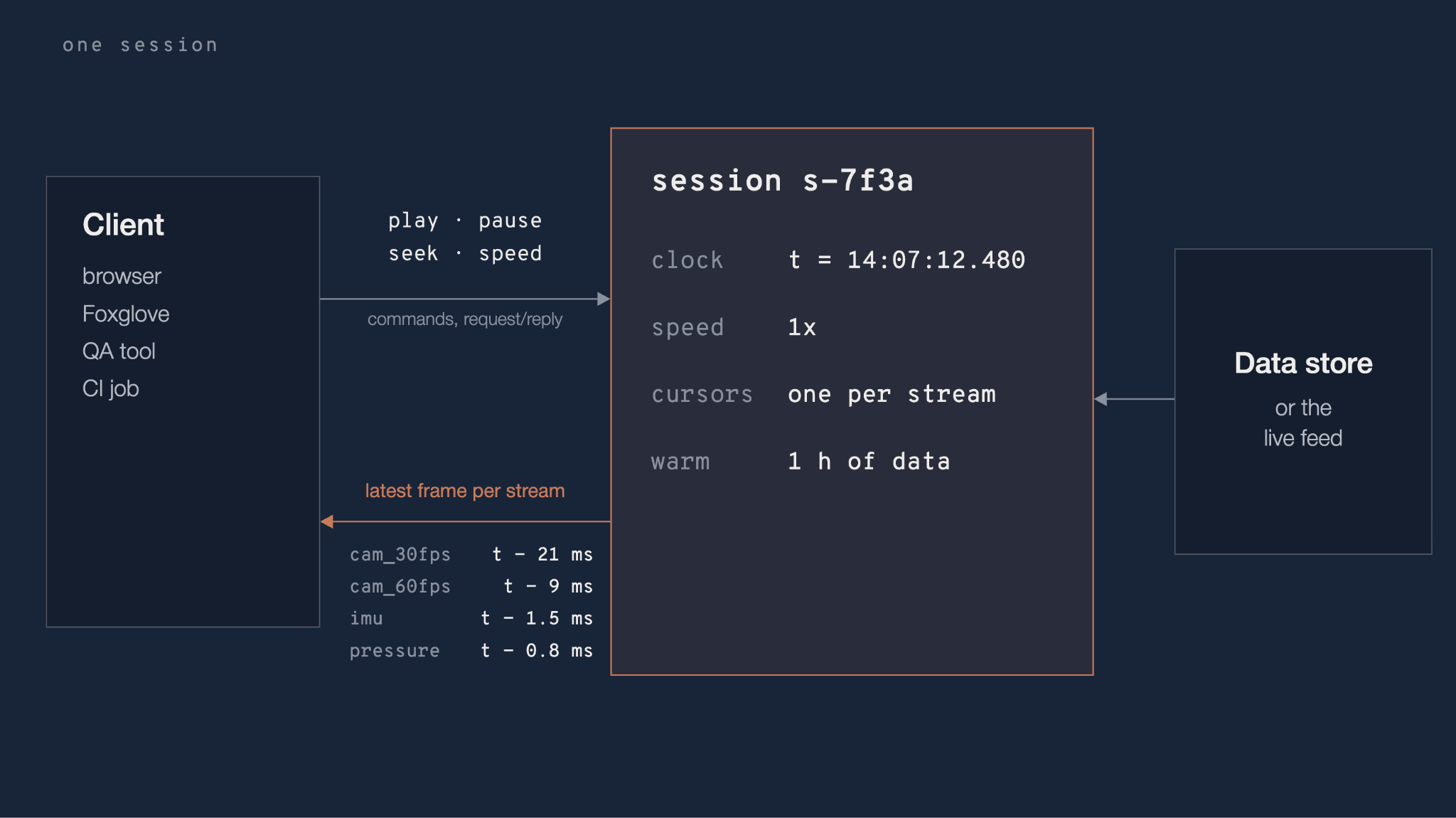
Because the session owns the clock, three things fall out of the design.
Playback speed is a clock setting. At 0.25x or 4x, t advances slower or faster and every stream follows.
Live is a clock setting too. Pin t to the newest data the platform has, and the same session serves the live view. That is what let us retire the C# pipeline: live and replay became one code path with one setting.
Concurrency comes from the session ID. Every session publishes its frames under its own prefix on the pub/sub layer, something like replay/<session-id>/imu, while the data store holds the recordings underneath. A new session is a new prefix, not new infrastructure, which gives three things for free:
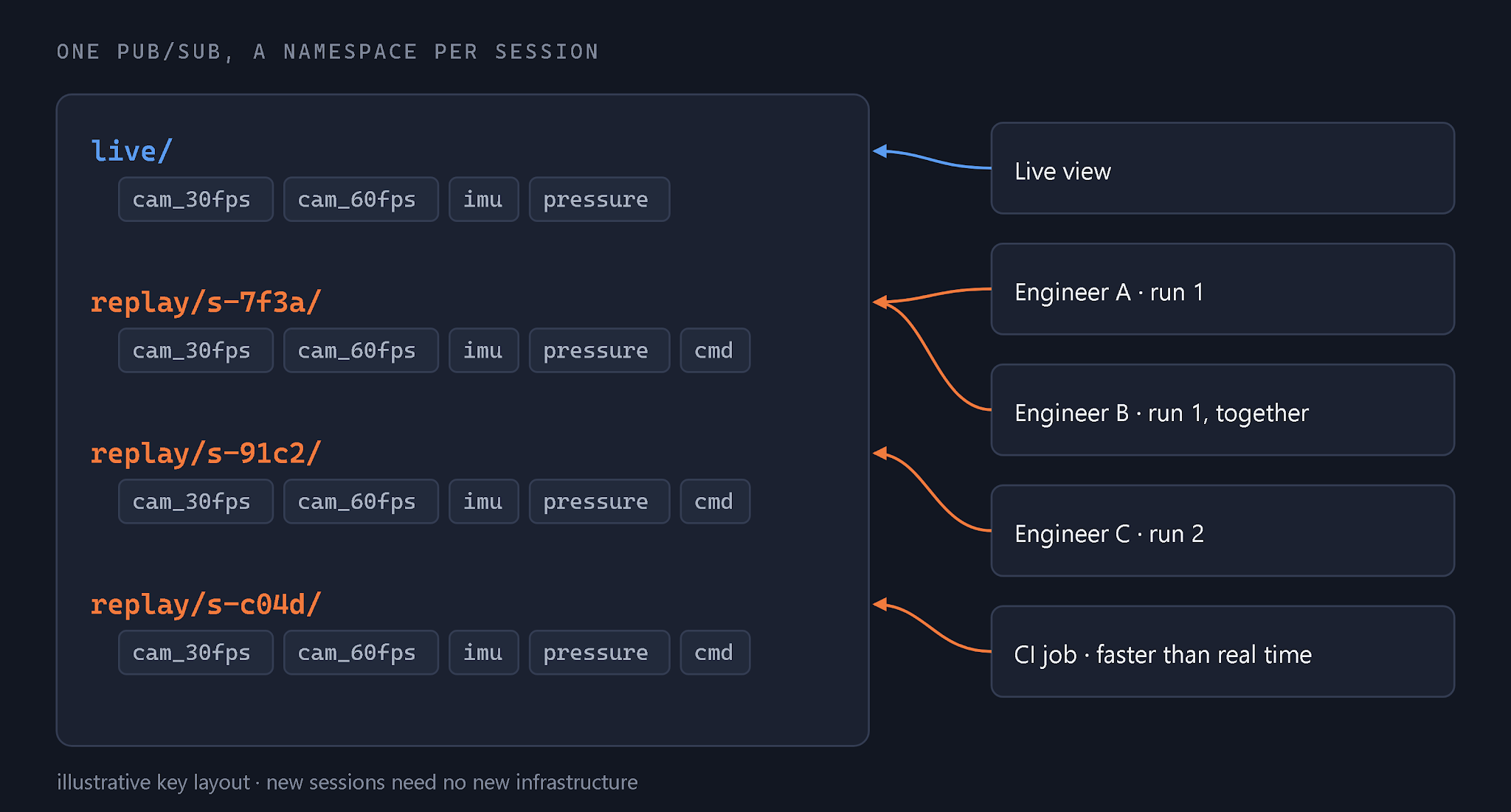
Sessions are not free. Each one keeps up to an hour of data preloaded (more on that below), so the number of sessions a server can hold is bounded by its memory, and an idle session has to be closed to give that memory back.
One clock is what makes “the same instant” mean the same thing to every stream and every tool. The robot stamps each sensor’s messages with its own clock. The server keeps another, and the gap between the two drifts. Unless one component owns time, every front end, CI job, and training pipeline ends up aligning the streams its own way, and they disagree about what happened at t.
There are two ways to own it. Make one stream the master, usually the camera, and line the others up to it. Or keep a wall clock and map every stream onto it. We chose the wall clock, owned by a component we called the recorder. A wall clock does not depend on any one sensor, so streams can be added, dropped, or replayed alone without changing what t means.
The recorder connects to the robot, speaks its protobuf messages, and owns time. Each sensor stamps its messages with a nanosecond timestamp from the robot’s clock. The recorder measures the offset between the two clocks and converts every timestamp to server time as messages arrive. From then on, “what happened at 14:07:03.250” has one answer for every stream, and it is the same answer in the live view, in replay, and in CI.
To produce that answer, the session uses one rule per stream: the latest sample at or before t. Streams at different rates line up without interpolation, and every stream always has something to show. The cost is staleness. At a given t, the 30 fps camera frame can be up to 33 ms older than the IMU sample beside it. We do not hide that. Every sample keeps its own timestamp, and the UI shows how far each stream sits from the playhead.
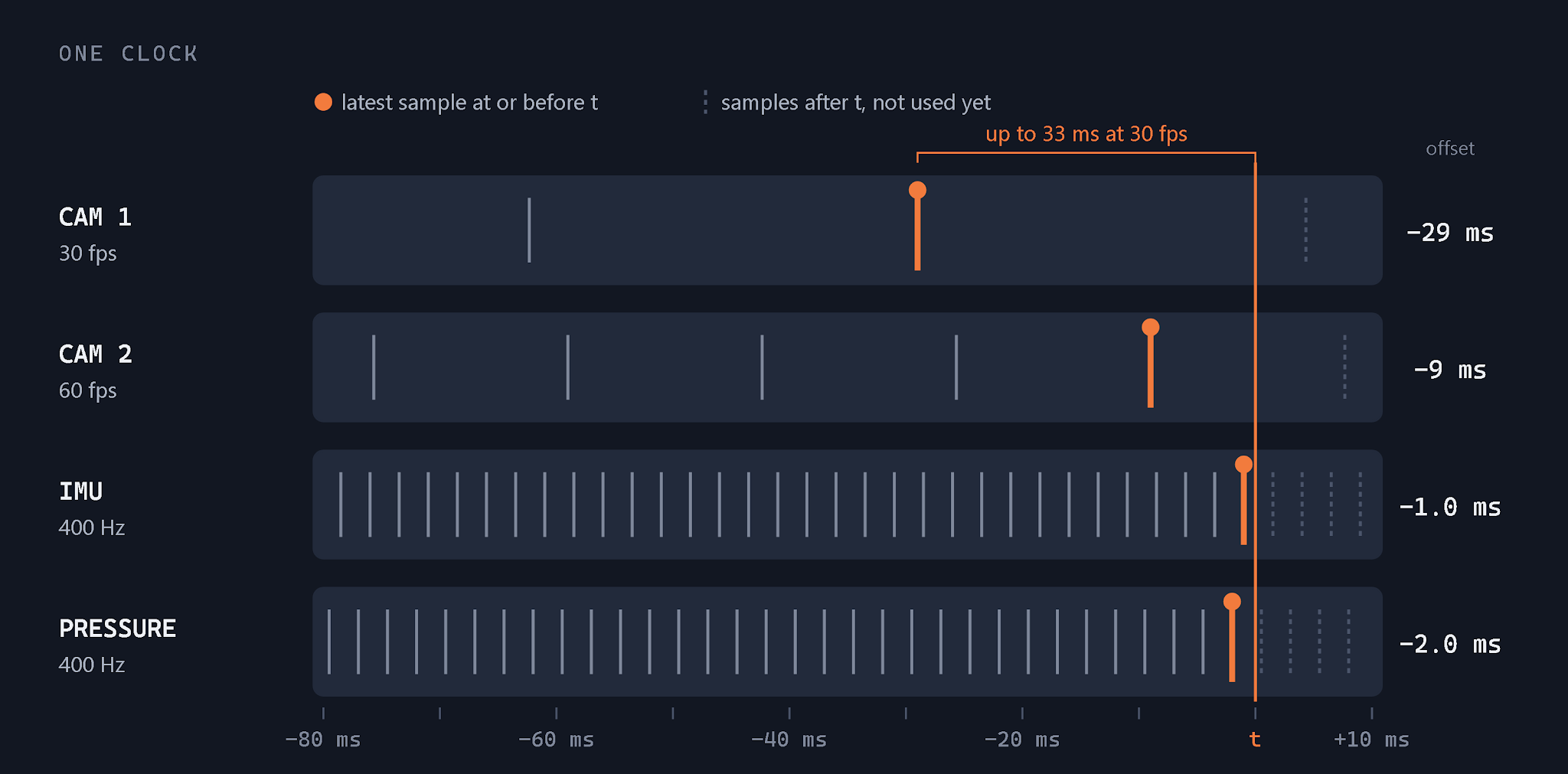
The automatic mapping is not always enough. Clocks drift, and some runs have offsets nobody can explain after the fact. So the QA tool lets a person nudge one stream by a fixed offset until it lines up, the way you would slide a track in an audio editor, and saves that offset with the run. The correction is made once, and CI and training replay the corrected version.
Moving the engine to the backend moves the hard problem with it. Once synchronizing and loading the data is the backend's job, every scrub, seek, or speed change is a command to a remote machine, and it still has to feel local. When you drag a playhead, you expect the picture to follow your hand.
Our first version did the obvious thing on a seek: drop everything in memory, clean up, and load again from the new position. With two cameras and a handful of 400 Hz streams, that was a cold start of about 10 seconds on every drag. It was the same stall we had left the browser to escape, now on a server.
The fix was to keep a preloaded window of data around the current position, tied to the session ID. A seek that lands inside the window is a cursor move: no load, no decode from scratch. A seek that lands outside it starts a load, but the session serves the nearest frames it already has while the rest fills in, so the client sees something immediately.
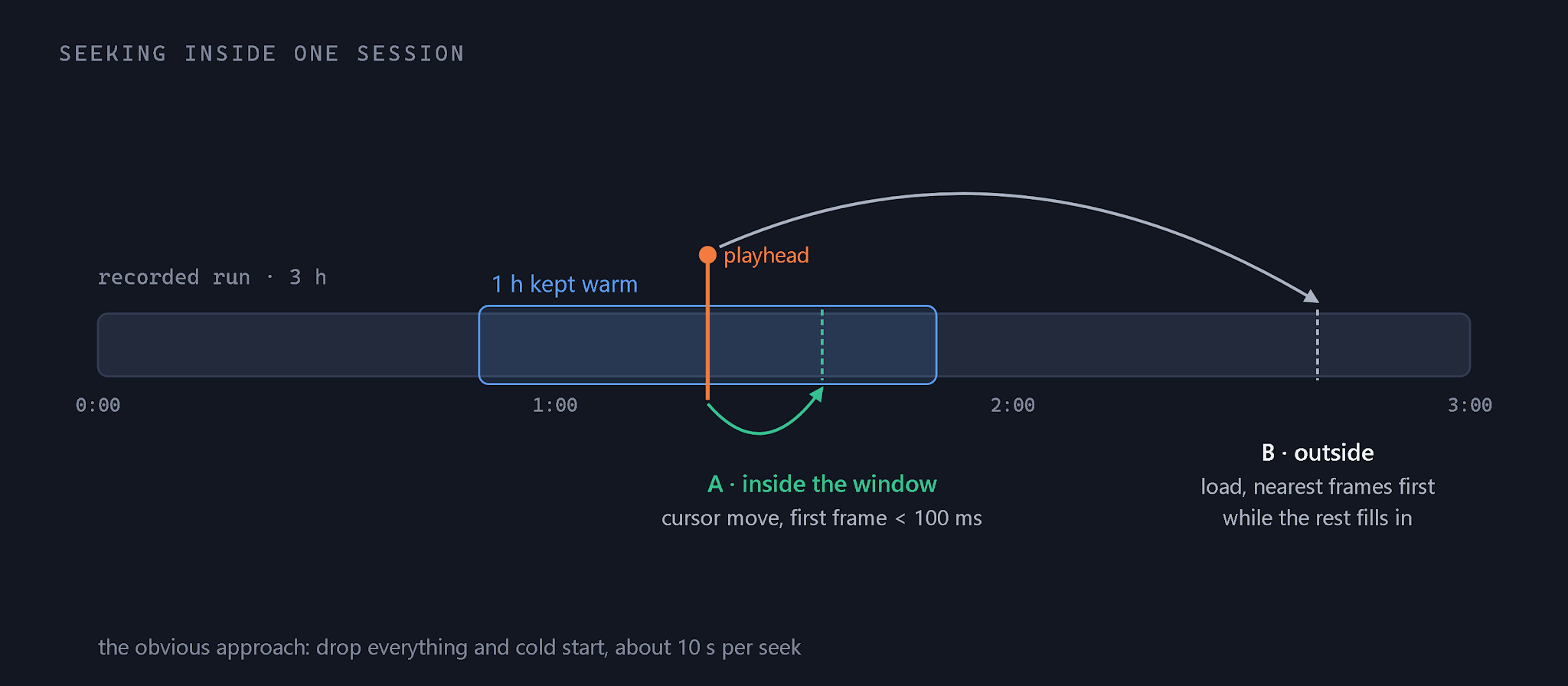
The window size is configurable. We left it at one hour. An hour covers most of a run, so nearly every scrub lands inside it. With the warm window, the first frame after a seek arrives in under 100 ms. That is the number that makes a drag feel like a drag.
The client swapped front ends several times during the project. Each swap cost almost nothing, because a front end only ever subscribes and sends four commands. When they moved to Foxglove, it connected over the Foxglove WebSocket protocol the same way it would to a live robot, and its playback controls became session commands. Foxglove does not know it is watching a recording, and the replay side needed no changes. It’s a headless replay platform, and a client can switch with no additional effort.
Today the client's engineers watch live data and replay any recorded run from the same platform, through whatever front end they like. CI runs the same sessions without a browser. The QA tool fixes alignment and turns good runs into training datasets. There is one definition of "what happened at t," and every tool uses it.
We have built systems like this before, and they get harder in proportion to the data. The reason to try something different was not novelty. The previous approach had a ceiling this client was going to hit, and we could see roughly when. Putting alignment behind a session on the backend is the boundary we expect to hold as they grow. The streams will change. The boundary should not have to.
Insights